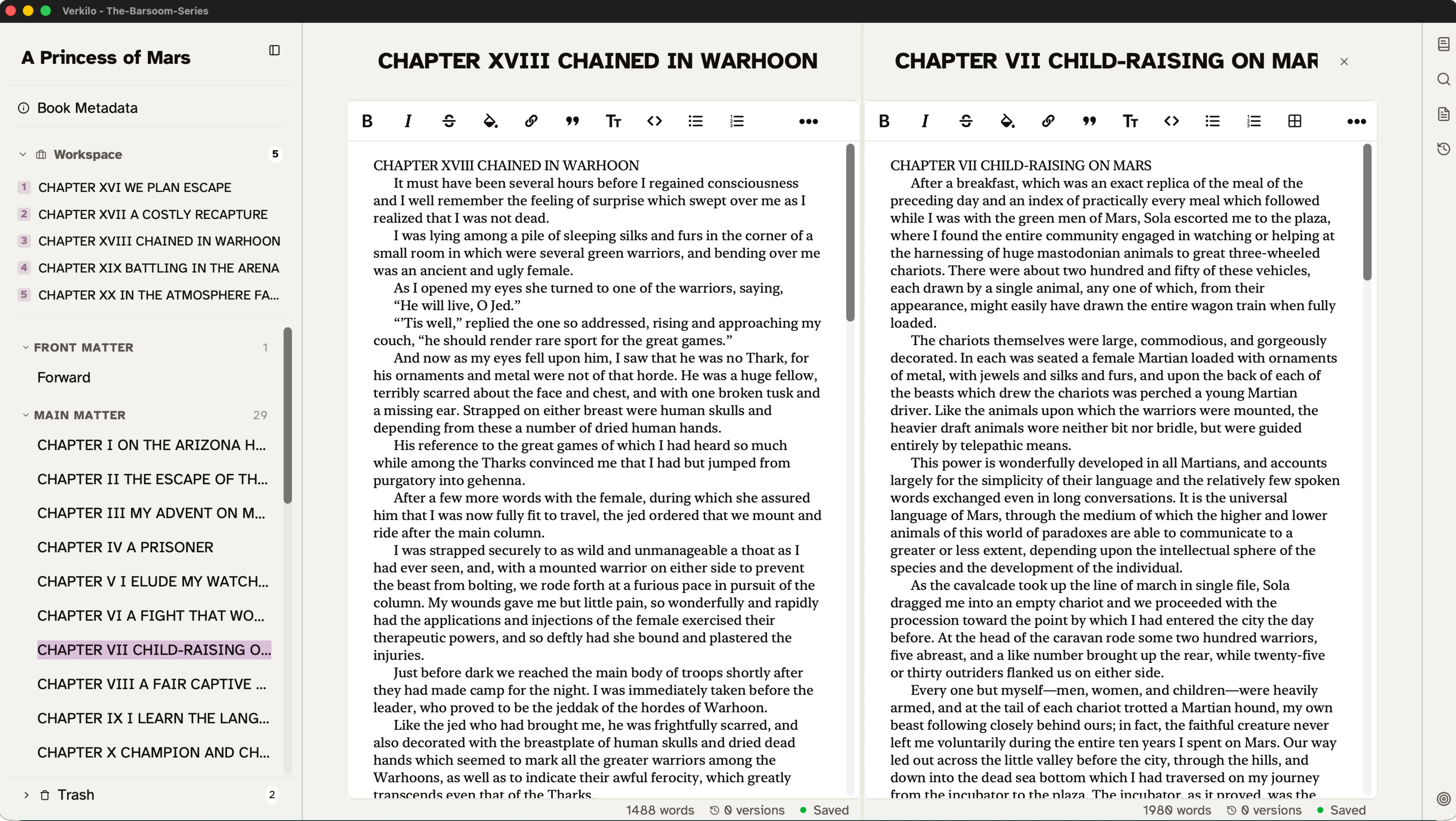
Audit Narrative Flow Without Losing Scene-Level Focus
Most tools force you to look at your manuscript through a straw, one scene at a time. While great for focus, it kills your sense of rhythm. I built Verkado™ to provide a stacked composite view, so you can see your scenes in context without breaking your organizational integrity.— Ben Wilson, Founder & Author
See Multiple Scenes Together
Writing in isolation can lead to jarring transitions: tonal shifts or repetitive beats that occur at chapter breaks. Verkado™ offers a middle ground that loads multiple sections into a single stacked view.
- Stacked composite view. Load a folder or multiple selected scenes into a unified editor stream. Finish the final paragraph of one chapter while referencing the opening lines of the next on the same screen.
- Edit adjacent scenes together. Refine a character's exit in one block while adjusting their entrance in the following block, without toggling between files.
- Visual structure preserved. Each block in the stack retains its own header and metadata toolbar, providing a realistic preview of the reader's experience while preserving your book's structure.
Merge and Split With Precision
Manuscript structure is fluid. As your narrative evolves, you may need to consolidate beats or break up oversized chapters. Verkilo provides tools to restructure your manuscript without leaving the editor.
- Merge sections. Consolidate two sections into one. Ideal for combining short scenes that share a POV and location into a cohesive chapter.
- Split at cursor. Break a section into two distinct pieces at your cursor's exact location.
- Automatic title handling. When splitting, automatically use selected text as the new section title, or perform a clean break to maintain your workflow.
Metadata Stays Attached
Unlike standard editors that flatten text when combining views, Verkado™ keeps your structural boundaries preserved until you decide to merge them.
- Audit your transitions. Spot repetitive sentence starters or pacing lulls that are invisible when scenes are viewed in isolation.
- Headers stay intact. Every block in the stack maintains its own metadata, chapter titles, and formatting anchors.
- Tags follow their sections. Your scene-specific Series Bible tags, including POV leads and character mentions, stay attached to their respective blocks even within a composite view.
Narrative Flow Comparison
| Feature | Standard Single-Scene Editing | Verkado™ Stacked View |
|---|---|---|
| Transition Context | Poor (requires toggling) | High (stacked visual flow) |
| Structural Integrity | Rigid | Fluid (merge and split tools) |
| Metadata Safety | Flat | Modular (section-based) |
| Pacing Audits | Manual, post-export | Real time, inline |
Try Verkado™ Stacked Editing & Manuscript Flow Today
Experience the full power of Verkilo with a 14-day free trial.
Start Your Free Trial